
[fixedWidth]
Important
This tag is available in the .NET API (StarMicronics.CloudPRNT-Utility package) V1.2.0 or later, and CPUtil V1.2.0 or later.
Prints text with the specified number of characters.
In combination with the template printing function, this tag can prevent print layout collapses due to changes in the number of characters in the text.
Shorthand
It is acceptable to use the abbreviation
fw instead of the full command name fixedWidth .Parameters
Parameter |
Description |
|---|---|
|
Required parameter. Specifies the text to be printed. |
|
Specify the maximum number of characters to print for |
|
Specifies whether the number of characters specified by
width should be counted as half-width (half) or full-width (full) characters.If omitted, half-width (
half) is used. |
|
Specifies the alignment when the text is shorter than the number of characters specified by
width.You can specify left-alignment (
left) or right-alignment (right). If omitted, the text will be left-aligned (left). |
|
If text is omitted, specify how the omitted portion should be replaced.
none : do not give an abbreviation(…) and omit the end of the text. This is the default.end : Append an ellipsis character(…) to omit the end of the text. this option cannot be used correctly on non-UTF-8 compatible printers. |
Example
Markup
This is a simple markup example, using only the [fixedWidth] and [cut] commands.
FixedWidth Sample

- Limited to 10 characters.
[fixedWidth: text 12345678901234567890; width 10]

- Limited to 10 characters.
[fixedWidth: text 12345678901234567890; width 10; et end]

- Limited to 20 characters and right alignment.
[fixedWidth: text Star Micronics; width 20; align right]

Normal Text : \
[fixedWidth: text Fixed; width 12; et end]\
: Normal Text\

Normal Text : \
[fixedWidth: text Fixed long text; width 12; et end]\
: Normal Text\

[cut]
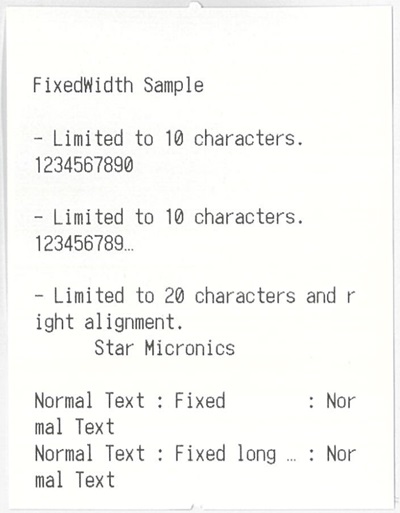
Output at 58mm
This is the result when using the markup processor to sent to an mC-Print2 58mm(2inch) printer.
Output at 80mm
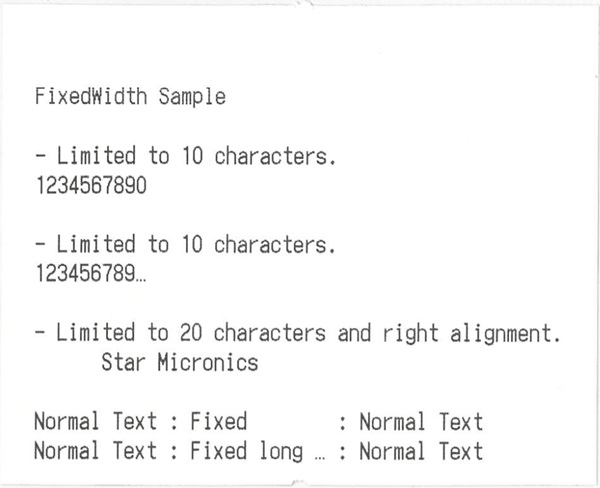
This is the result when using the markup processor to sent to a TSP650II 80mm(3inch) printer.