

Search for Printer
Understand the differences between these SDKs before migrating to StarXpand SDK.
StarPRNT SDK
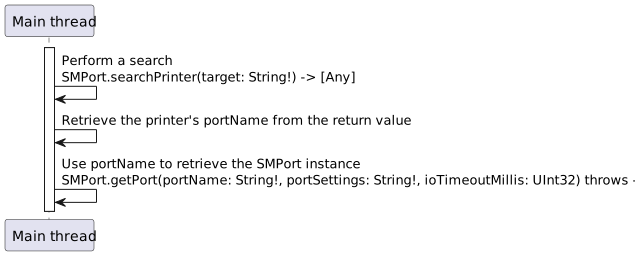
Use the synchronous API searchPrinter() of the SMPort class to search.
searchPrinter() returns an array of detected printers as a return value after searching for a specified period.
When using the printer, retrieve portName from the return value and use the SMPort.getPort() method to generate an SMPort instance.
Specify the interface to search for using a string such as "BT:" or "TCP:".
The search time is fixed for each interface.
Sample code (GitHub)
StarXpand SDK
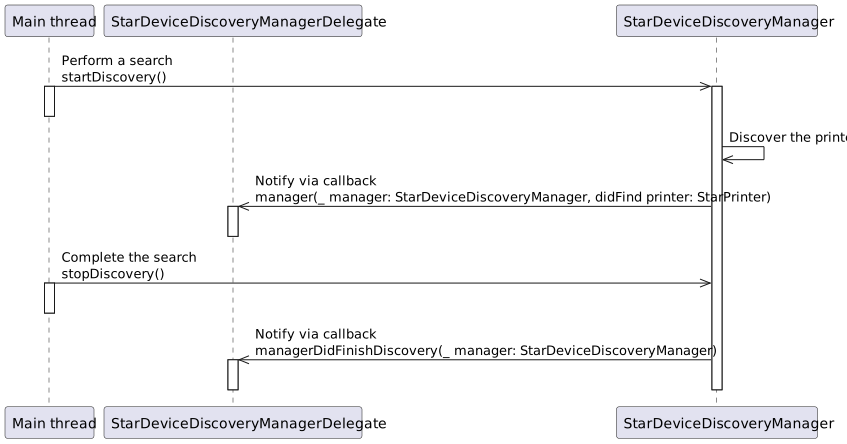
Use the asynchronous API startDiscovery() method of the StarDeviceDiscoveryManager class to start searching.
The search automatically ends after the specified search time elapses. To cancel the search, call the stopDiscovery() method.
Printer search results and search completion are notified via the StarDeviceDiscoveryManagerDelegate protocol method.
Search results can be retrieved as a ready-to-use StarPrinter instance.
Specify the interface to search for using an InterfaceType enum value.
The search time can be set to any value.
Sample code (GitHub)
Comparison between the two SDKs
| StarPRNT SDK | StarXpand SDK | |
|---|---|---|
| Asynchronous API | Unsupported | Supported. Allowing another process to be executed during the search |
| Search interface | Text | Enum value |
| Search time | Fixed value | Any value |
| Return value | Array of printer information | StarPrinter instance |
Process flow (sequence diagram)
For the process flow of each SDK, see the corresponding diagram below:
Refer to Supported API List for information on whether each API is supported in StarPRNT SDK and StarXpand SDK.
Understand the differences between these SDKs before migrating to StarXpand SDK.
StarPRNT SDK
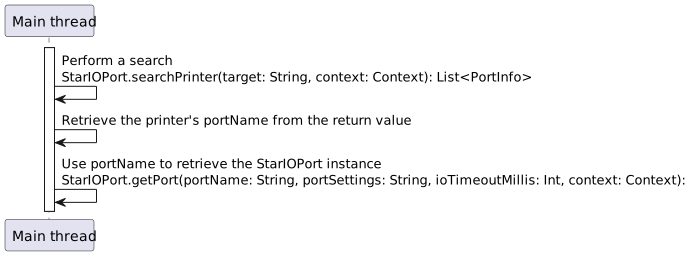
Use the synchronous API searchPrinter() of the StarIOPort class to search.
searchPrinter() returns a PortInfo list for the detected printers as a return value after searching for a specified period.
When using the printer, retrieve portName from the return value and use the StarIOPort.getPort() method to generate a StarIOPort instance.
Specify the interface to search for using a string such as "BT:" or "TCP:".
The search time is fixed for each interface.
Sample code (GitHub)
StarXpand SDK
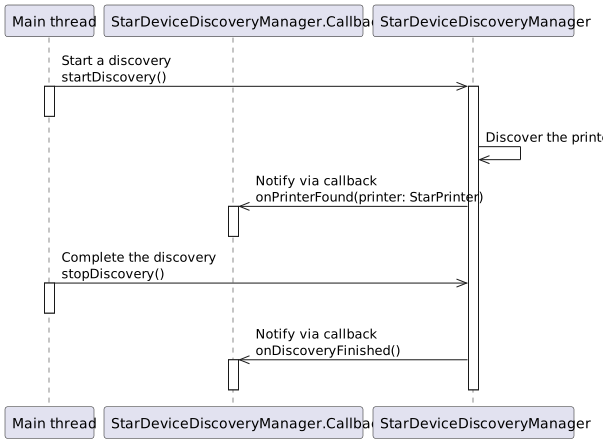
Use the asynchronous API startDiscovery() method of the StarDeviceDiscoveryManager class to start searching.
The search automatically ends after the specified search time elapses. To cancel the search, call the stopDiscovery() method.
Printer search results and search completion are notified via the StarDeviceDiscoveryManager.Callback interface method.
Search results can be retrieved as a ready-to-use StarPrinter instance.
Specify the interface to search for using an InterfaceType enum value.
The search time can be set to any value.
Sample code (GitHub)
Comparison between the two SDKs
| StarPRNT SDK | StarXpand SDK | |
|---|---|---|
| Asynchronous API | Unsupported | Supported. Allowing another process to be executed during the search |
| Search interface | Text | Enum value |
| Search time | Fixed value | Any value |
| Return value | PortInfo list | StarPrinter instance |
Process flow (sequence diagram)
For the process flow of each SDK, see the corresponding diagram below:
Refer to Supported API List for information on whether each API is supported in StarPRNT SDK and StarXpand SDK.