

Send Printing Data
Understand the differences between these SDKs before migrating to StarXpand SDK.
StarPRNT SDK
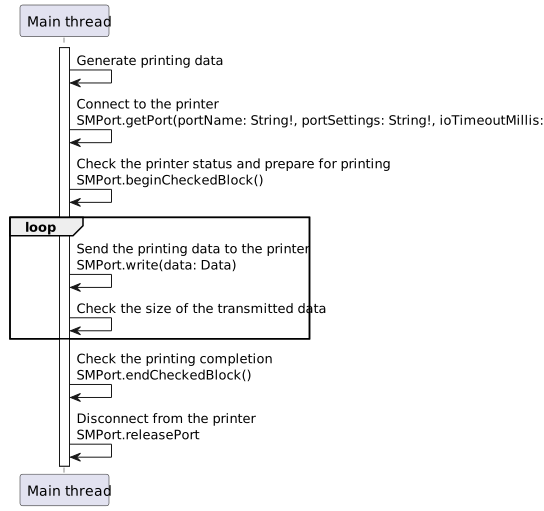
Connection to the printer and printing are performed as follows:
- 1. Use SMPort.getPort() to connect to the printer.
- 2. Use the SMPort.beginCheckedBlock() method to check the printer status and prepare for printing.
- 3. Generate printing data.
For details, refer to Generate Printing Data. - 4. Use the SMPort.write() method to send printing data to the printer.
- 5. Check the size of the transmitted data and numberOfBytesWritten.
If the data was not fully transmitted, pass the remaining data to SMPort.write() and retransmit.
If all of the data has been transmitted, proceed to Step 6. - 6. Use the SMPort.beginCheckedBlock() method to check the printing completion.
- 7. Use the SMPort.releasePort() method to disconnect from the printer.
StarXpand SDK
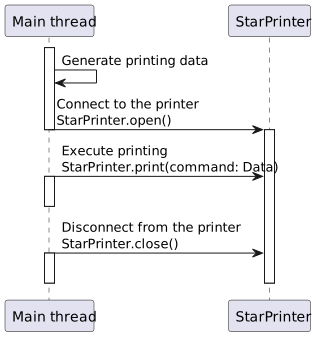
- 1. Generate printing data.
For details, refer to Generate Printing Data. - 2. Use the StarPrinter.open() method to connect to the printer.
- 3. Specify printing data in the argument to the StarPrinter.print(command:) method and execute printing.
- 4. Use the StarPrinter.close() method to disconnect from the printer.
Comparison between the two SDKs
| StarPRNT SDK | StarXpand SDK | |
|---|---|---|
| Asynchronous API | Unsupported | Supported |
| Printing data transmission/status check [1] |
Manually beginCheckedBlock(), write(), endCheckedBlock() |
Automatically StarPrinter.print(command:) |
| Spooler function | Unsupported | Supported |
| Split transmission/retransmission [2] | Manually retransmitted | Automatically retransmitted |
[1] In StarPRNT SDK, there is a need to use beginCheckedBlock(), write(), and endCheckedBlock() of the SMPort class to check the printing data transmission status and the pre- and post-transmission status. In StarXpand SDK, these operations are performed automatically by the StarPrinter.print(command:) method.
[2] In StarPRNT SDK, there is a need to check the size of data transmitted by SMPort.write() and manually retransmit any remaining data.
In StarXpand SDK, retransmission is performed automatically by StarPrinter.print(command:).
Process flow (sequence diagram)
For the process flow of each SDK, see the corresponding diagram below:
Refer to Supported API List for information on whether each API is supported in StarPRNT SDK and StarXpand SDK.
Understand the differences between these SDKs before migrating to StarXpand SDK.
StarPRNT SDK
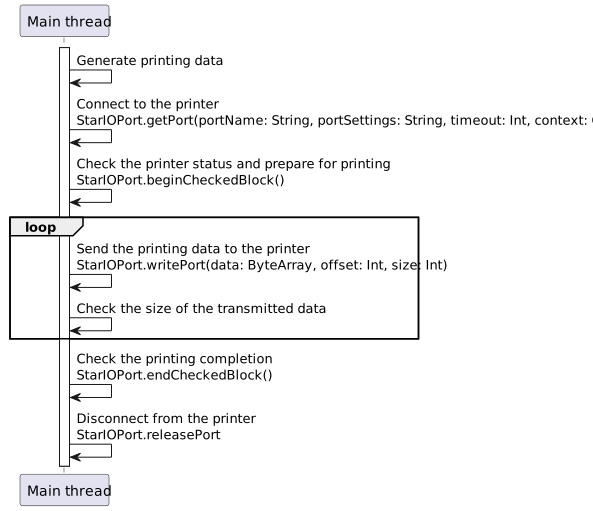
Connection to the printer and printing are performed as follows:
- 1. Use StarIOPort.getPort() to connect to the printer.
- 2. Use the StarIOPort.beginCheckedBlock() method to check the printer status and prepare for printing.
- 3. Generate printing data.
For details, refer to Generate Printing Data. - 4. Use the StarIOPort.writePort() method to send printing data to the printer.
- 5. Use the StarIOPort.endCheckedBlock() method to check the printing completion.
- 6. Use the StarIOPort.releasePort() method to disconnect from the printer.
StarXpand SDK
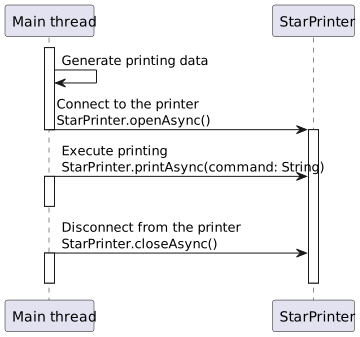
- 1. Generate printing data.
For details, refer to Generate Printing Data. - 2. Use the StarPrinter.openAsync() method to connect to the printer.
- 3. Specify printing data in the argument to the StarPrinter.printAsync(command) method and execute printing.
- 4. Use the StarPrinter.closeAsync() method to disconnect from the printer.
Comparison between the two SDKs
| StarPRNT SDK | StarXpand SDK | |
|---|---|---|
| Asynchronous API | Unsupported | Supported |
| Printing data transmission/status check [1] |
Manually beginCheckedBlock(), endCheckedBlock() |
Automatically StarPrinter.printAsync(command) |
| Spooler function | Unsupported | Supported |
| Split transmission/retransmission [2] | Manually retransmitted | Automatically retransmitted |
[1] In StarPRNT SDK, there is a need to use beginCheckedBlock(), write(), and endCheckedBlock() of the StarIOPort class to check the printing data transmission status and the pre- and post-transmission status. In StarXpand SDK, these operations are performed automatically by the StarPrinter.printAsync(command) method.
[2] In StarPRNT SDK, there is a need to check the size of data transmitted by StarIOPort.writePort() and manually retransmit any remaining data.
In StarXpand SDK, retransmission is performed automatically by the StarPrinter.printAsync(command) method.
Process flow (sequence diagram)
For the process flow of each SDK, see the corresponding diagram below:
Refer to Supported API List for information on whether each API is supported in StarPRNT SDK and StarXpand SDK.