

ペアリングを行う(Bluetooth Low Energy)
デバイスとプリンターがペアリングされていない場合、ユーザーに対してペアリング要求を行います。
また、ペアリング要求に対するユーザーの操作結果についても判定することができます。
以下の手順を参考に、デバイスとプリンターの接続を行い、ペアリングの結果を受け取ってください。
Memo
- 「Passkey Entry」 パスキーの入力が必要です。入力時間には制限があり、モデルによってパスキーの設定値が異なります。各モデルに付属のマニュアルを参考に、入力するパスキーを事前にご確認ください。
- 「Numeric comparison」 ペアリングコードがホストデバイスに表示され、プリンターからペアリングコードが印字されます。ペアリングコードが一致していることを確認し、プリンターのフィードボタンを押し、ホストデバイスの確認に対して承認を行ってください。
ペアリングは初回のプリンターとの接続時にのみ行われ、一度ペアリングに成功すれば次回以降行われません。
ただし、お使いのデバイスのBluetooth設定を初期化した場合やプリンターを交換した際には、再度ペアリングが必要となります。
ペアリング手順
以下の手順を参考に、デバイスとプリンターの接続を行い、ペアリングの結果を受け取ってください。
1Bluetooth Low Energyの接続情報を調べます。
StarDeviceDiscoveryManagerを使って、ペアリングを行いたいプリンターのBluetooth Low Energyのデバイスアドレスを調べます。
ページ下部にサンプルコードがありますので参考にしてください。
2プリンターの接続先情報を作ります。
通信に使用するinterfaceTypeをBluetoothLE、接続先を指定するidentifierにBluetooth Low Energyのアドレスをセットしてください。
var settings = new StarConnectionSettings();
settings.interfaceType = InterfaceType.BluetoothLE;
settings.identifier = “00:11:62:00:00:01”;
3プリンターの接続先情報を与えて、StarPrinterインスタンスを取得します。
iOSの場合、タイムアウトを30秒に設定してください。
var printer = new StarPrinter(settings);
printer.openTimeout = 30_000
4プリンターに接続するためopenメソッドを呼び出します。
try {
    await printer.open();
5 プリンターとデバイスのペアリングが行われていない場合、以下のペアリング要求画面が表示されます。画面の案内にしたがって操作を行ってください。
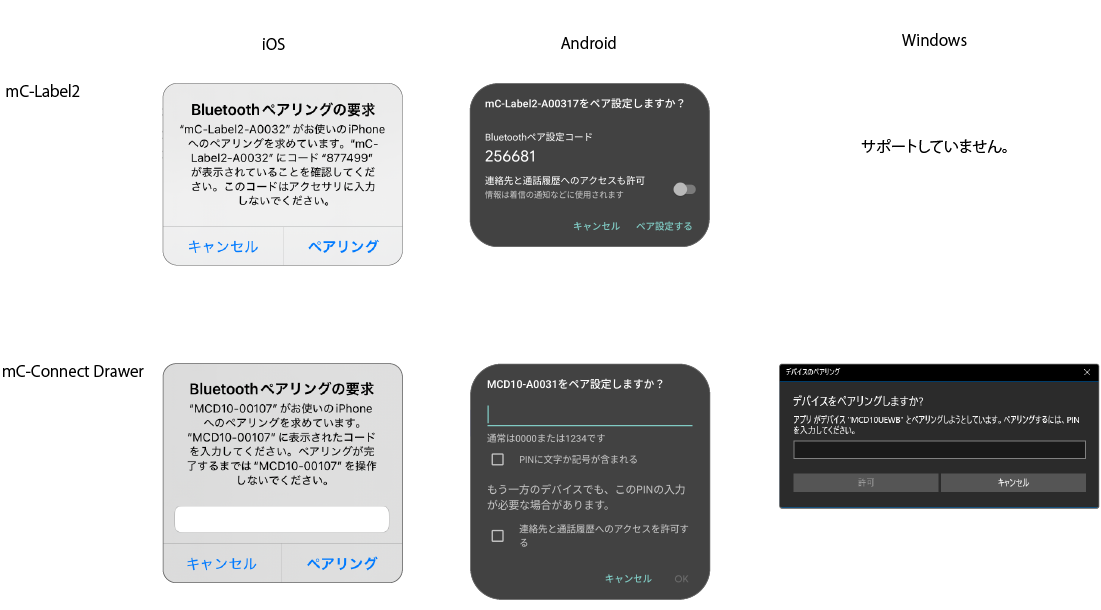
Androidでは「サイレントモード」を無効にしてください。有効となっている場合、ペアリングに必要なメッセージが通知されず、ペアリング操作を完了することができません。
6エラー時の処理を実装します。errorインスタンスの型とStarIO10ErrorCodeによりペアリングの失敗を判別できます。
catch(error) {
    if (error instanceof StarIO10NotFoundError) {
        // Printer not found.
        // This may be due to the printer not being turned on or incorrect connection information.
    }
    else if (error instanceof StarIO10IllegalDeviceStateError) {
        if (error.code == StarIO10ErrorCode.BluetoothUnavailable) {
            // The Bluetooth function of the host device cannot be used.
        }
        else if (error.code == StarIO10ErrorCode.BluetoothLeDeviceIsNotPaired) {
            // Pairing failed. Please try again with the correct operation.
        }
    }

    console.log(`Error: ${String(error)}`);
}
7プリンターとの接続を切断するためcloseメソッドを呼び出します。
finally {
    await printer.close();
8printerインスタンスを破棄するためdisposeメソッドを呼び出します。
await printer.dispose();
private _manager?: StarDeviceDiscoveryManager;

private startDiscovery = async() => {
  try {
    var interfaceTypes: Array<InterfaceType> = [InterfaceType.BluetoothLE];
    this._manager = await StarDeviceDiscoveryManagerFactory.create(interfaceTypes);
    this._manager.discoveryTime = 10000;
    this._manager.onPrinterFound = (printer: StarPrinter) => {
      var identifier = printer.connectionSettings.identifier;
      var deviceName = printer.information?.detail.bluetoothLE.deviceName;
      console.log(`Found printer: $identifier - $deviceName.`);
    };

    this._manager.onDiscoveryFinished = () => {
        console.log(`Discovery finished.`);
    };
    await this._manager.startDiscovery();
  }
  catch(error) {
    if (error instanceof StarIO10IllegalDeviceStateError) {
      if (error.codeCode == StarIO10ErrorCode.BluetoothUnavailable) {
          // Example of error: Bluetooth capability of host device is disabled.
          // This may be due to the host device's Bluetooth being off, the host device not having Bluetooth, etc.
      }
    }
    console.log(`Error: ${String(error)}`);
  }
}
async function Pairing(identifier: String) {
    var settings = new StarConnectionSettings();
    settings.interfaceType = InterfaceType.BluetoothLE;
    settings.identifier = identifier;

    var printer = new StarPrinter(settings);

    try {
        await printer.open();
    }
    catch(error) {
        if (error instanceof StarStarIO10NotFoundError) {
            if (error.codeCode == StarIO10ErrorCode.BluetoothUnavailable) {
                // Printer not found.
                // This may be due to the printer not being turned on or incorrect connection information.
            }
        }
        else if (error instanceof StarIO10IllegalDeviceStatError) {
            if (error.codeCode == StarIO10ErrorCode.BluetoothUnavailable) {
                // Example of error: Bluetooth capability of host device is disabled.
                // This may be due to the host device's Bluetooth being off, the host device not having Bluetooth, etc.
            }
            else if (error.codeCode == StarIO10ErrorCode.BluetoothLeDeviceIsNotPaired) {
                // Pairing failed. Please try again with the correct operation
            }
        }
       console.log(`Error: ${String(error)}`);
    }
    finally {
        await printer.close();
        await printer.dispose();
    }
}